Looking up IT assets should not take this long
Manual inventory is slow
Walking through offices checking equipment one by one, writing down serial numbers on paper or in a spreadsheet. A full inventory takes days.
Typing leads to errors
Manually entering long serial numbers and asset tags is error-prone. One wrong digit means looking up the wrong asset or getting no results at all.
No scanning in the field
Your asset management system is on a desktop, but your equipment is in meeting rooms, server closets, and on people's desks. You need to look up assets where they are.
BetterDesk: your IT asset scanner
Phone Camera Scanning
Use your phone camera to scan barcodes and QR codes on any piece of equipment. No dedicated hardware needed, just your iPhone or Android.
Instant Asset Lookup
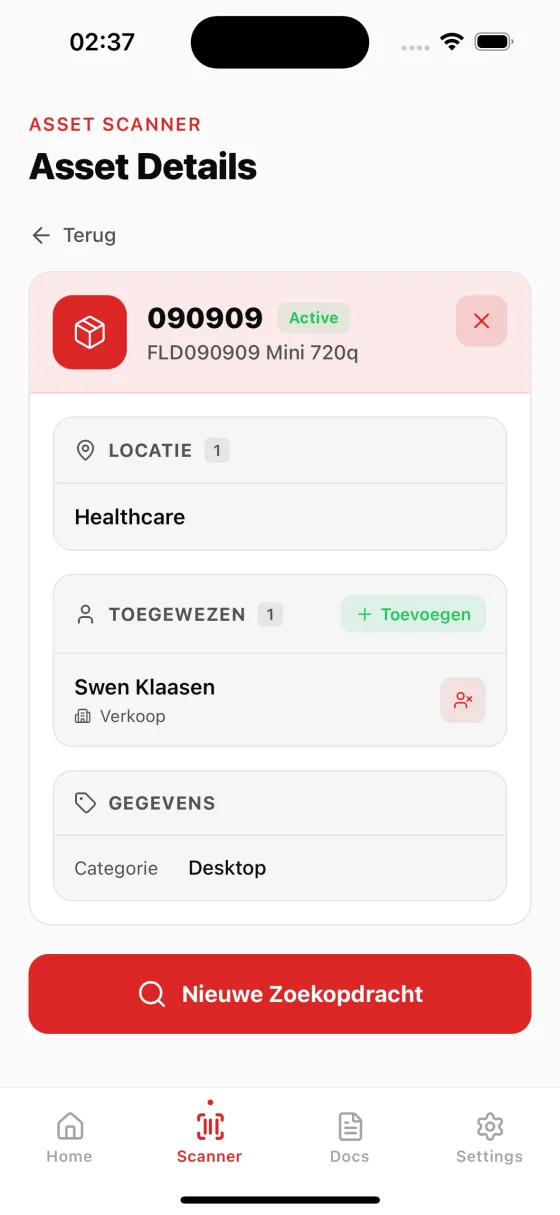
The moment you scan, BetterDesk searches your asset database and shows full details: type, status, assignee, location, and custom fields.
Works With Your Systems
BetterDesk connects to TOPdesk and other IT asset management systems. Your existing asset data is available instantly on your phone.
How it works
Point your camera
Open BetterDesk on your phone and point the camera at the barcode or QR code on the equipment. It reads instantly.
See the asset details
The full asset information appears on screen: name, type, serial number, status, assignee, and any custom fields from your system.
Take action
View attachments, check assignment history, or start a document workflow directly from the asset detail screen.
Faster inventory, fewer errors, better data
Complete inventory audits in hours, not days
Traditional IT inventory audits require walking through every location, reading serial numbers, and manually entering them into a system. With BetterDesk, your team simply walks through the space and scans each barcode with their phone. The asset is instantly identified and marked as verified. What used to take an entire week for a medium-sized office can now be completed in a single afternoon. The time savings compound as your asset count grows, making BetterDesk indispensable for organizations managing hundreds or thousands of devices.
Eliminate data entry errors entirely
Human error is unavoidable when typing long serial numbers and asset tags by hand. A single transposed digit can lead to misidentified assets, incorrect records, and hours of troubleshooting. Barcode scanning removes human input from the equation. The camera reads the exact value encoded in the barcode, no typos, no misread characters, no guesswork. Your asset database stays accurate, and your team can trust the data they see on screen. Over time, this accuracy compounds into a significantly cleaner and more reliable asset registry.
Real-time location and status tracking
Every scan is logged with a timestamp and the location where it occurred. This gives you a real-time picture of where your assets are and when they were last verified. If a laptop was scanned in the Amsterdam office last Tuesday and is now reported as missing in Rotterdam, you have actionable data to investigate. BetterDesk turns every barcode scan into a location checkpoint, building a historical trail of asset movements without any additional effort from your team.
Works with any phone, no special hardware
BetterDesk uses the built-in camera on any modern iPhone or Android device. There is no need to purchase dedicated barcode scanners, Bluetooth accessories, or specialized mobile devices. Your IT staff uses the phones they already carry. The scanning engine is optimized for speed and works reliably even in low-light conditions such as server rooms and storage closets. This zero-hardware-cost approach means you can deploy barcode scanning to your entire team instantly, without procurement delays or additional budget requests.
Frequently asked questions about IT asset barcode scanning
Open the BetterDesk app on your phone, point the camera at a barcode or QR code on any piece of IT equipment, and instantly see all asset details including owner, location, specifications, and assignment history.
BetterDesk supports all common barcode formats including Code 128, Code 39, EAN-13, UPC-A, and QR codes. If your IT equipment has a barcode label, BetterDesk can scan it.
You can generate and print barcode labels from the BetterDesk web dashboard. Create labels for your assets and apply them to equipment, then scan them with the mobile app for instant lookup.
BetterDesk uses advanced camera scanning technology that works reliably in various lighting conditions. Scans are instant, typically under one second. The app works on any modern iPhone or Android device.
BetterDesk recognizes a comprehensive range of one-dimensional and two-dimensional barcode formats. For 1D barcodes, this includes Code 128, Code 39, Code 93, EAN-8, EAN-13, UPC-A, UPC-E, Interleaved 2 of 5, and Codabar. For 2D codes, BetterDesk supports QR codes, Data Matrix, and PDF417. This covers virtually every barcode label format used by IT equipment manufacturers, third-party asset tagging services, and in-house label printers. If you are unsure whether your labels are compatible, the app will tell you immediately when you attempt a scan.
Yes. BetterDesk includes a continuous scanning mode designed specifically for inventory audits. In this mode, you scan one asset after another without returning to the home screen between scans. Each scanned asset is logged with its timestamp and location, and you can review the full list of scanned items when you are done. This is ideal for walking through a server room, office floor, or warehouse and rapidly verifying every piece of equipment. The scanned inventory can be exported or compared against your expected asset list to identify missing or unaccounted-for items.