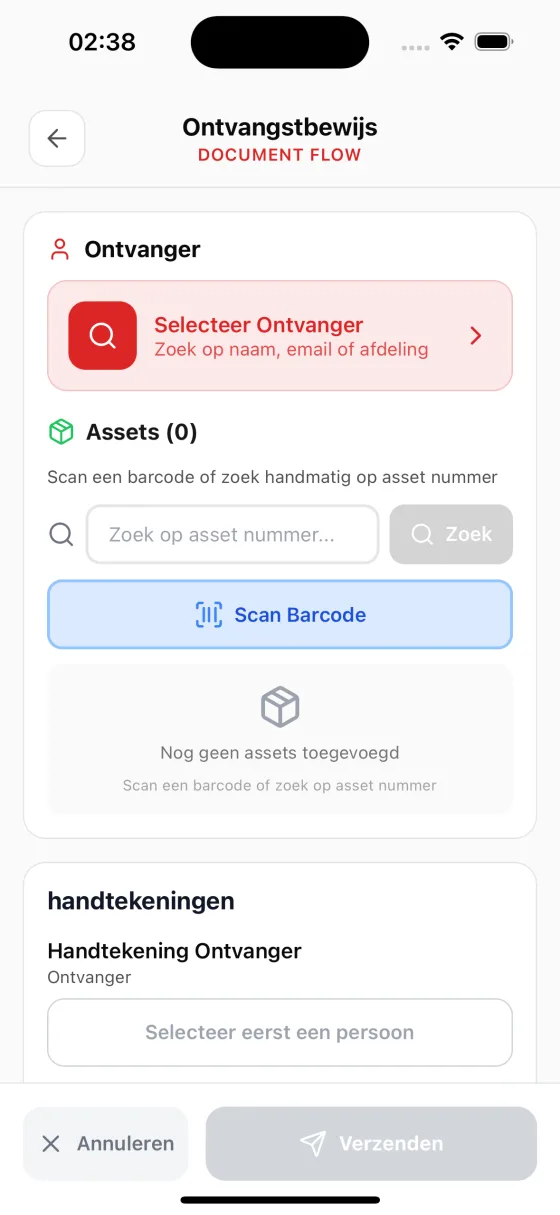
Paper signatures slow everything down
Paper-based signatures
Printing forms, collecting wet signatures, scanning them back in, and filing them away. It's a tedious process that wastes time and paper.
No audit trail
Paper signatures don't prove when or where they were collected. If a dispute arises, you have no reliable evidence of the signing context.
Manual document handling
Every signed document has to be manually scanned, uploaded to TOPdesk, and linked to the right asset. Steps get skipped and documents get lost.
BetterDesk: digital signatures for TOPdesk
Sign on Screen
Draw your signature directly on the device screen. Works on any phone or tablet, no special hardware or stylus needed.
See how IT handovers work →Automatic Location & Timestamp
Every signature is automatically enriched with GPS coordinates, date, time, and signer information. No manual entry required.
Complete Audit Trail
Every signed document generates a legally valid PDF with embedded signature data, location proof, and a complete chain of custody.
From paper to digital in three steps
Create a Document Flow
Build a digital form in the BetterDesk dashboard using drag-and-drop. Add signature fields, asset scanners, and recipient selectors.
Collect Signatures
Open the document flow on your phone. Fill in the details, scan the asset, and let the recipient sign directly on the screen.
Auto-Generate & Deliver
BetterDesk generates a signed PDF with the full audit trail and uploads it to TOPdesk automatically. No scanning or manual uploading needed.
Modernize your signing process with confidence
Legally valid signatures
Every signature captured through BetterDesk includes a comprehensive set of metadata that establishes legal validity. GPS coordinates confirm the signing location, timestamps record the exact moment of signing, and signer identity is verified through authenticated sessions. This combination of evidence creates a stronger proof of signing than traditional wet signatures on paper, which can be easily disputed without context about when, where, or by whom they were made.
Complete audit trail
BetterDesk automatically generates a detailed audit trail for every signed document. This includes the full chain of custody from document creation to final signature, along with IP addresses, device information, and session data. The audit trail is embedded directly in the generated PDF and stored in your TOPdesk environment. When internal auditors or external regulators request documentation, you can produce a complete, tamper-evident record of every signing event.
Sign in seconds, not days
Paper-based signing workflows can take days or even weeks when documents need to be printed, physically transported, signed, scanned, and filed. BetterDesk compresses this entire process into seconds. The signer draws their signature directly on the device screen, and the completed document is generated and delivered automatically. For IT teams processing multiple asset handovers per day, this acceleration translates into significant time savings and faster equipment deployments.
Reduce paper waste
Every digital signature eliminates the need for printed forms, physical filing, and document scanning. For organizations processing hundreds of asset handovers per year, the reduction in paper consumption is substantial. Beyond the environmental benefit, going paperless also eliminates the cost of printing supplies, physical storage space for filing cabinets, and the risk of document loss or damage. Your signed records are stored securely in digital form and accessible from anywhere.
Built for regulatory compliance
GDPR compliant
BetterDesk processes personal data in full compliance with the General Data Protection Regulation. Signature data is stored encrypted, access is limited to authorized users within your organization, and data processing agreements are available for all customers. Personal data collected during the signing process is limited to what is strictly necessary for establishing the validity of the signature, following the principle of data minimization.
eIDAS aligned
Digital signatures captured through BetterDesk are designed to align with the requirements for advanced electronic signatures under the European eIDAS regulation. Each signature is linked to the signatory, captures identifying information, and is recorded together with a comprehensive audit trail. This evidence helps demonstrate the authenticity and integrity of the signing event; whether a specific signature qualifies as an advanced or qualified electronic signature depends on your own processes and legal assessment.
Configurable data retention
BetterDesk gives your organization full control over how long signed documents and signature data are retained. You can configure retention policies that align with your internal governance requirements and applicable regulations. Signed PDFs are stored in your TOPdesk environment according to your existing document management policies, and BetterDesk does not retain copies of your signed documents beyond what is needed for service operation.
Frequently asked questions about digital signing with TOPdesk
With BetterDesk you can sign TOPdesk documents digitally. Create a document workflow in the dashboard, open it on your phone, and let the recipient sign directly on the screen. The signed PDF is automatically uploaded to TOPdesk.
Yes. Every digital signature includes GPS location, timestamp, IP address, and signer information. This creates a complete audit trail that serves as legally valid proof of signing.
No. BetterDesk works as an add-on to TOPdesk. You don't need to change anything in your TOPdesk environment. Signed documents are automatically attached to the correct asset in TOPdesk.
You can sign digitally on any device with a touchscreen. The BetterDesk app is available for iOS and Android, and the web dashboard works in any browser. No special hardware or stylus needed.
BetterDesk costs €99 per month for unlimited users and unlimited access. This includes digital signing, barcode scanning, document workflows, and the mobile app. A free trial is also available.