Finding asset details should not be this hard
Looking up assets takes too long
Walking to a computer, logging into your asset management system, and searching by serial number. By the time you find the record, you have lost minutes you could have spent on actual work.
Typing serial numbers causes mistakes
Manually entering long serial numbers and asset tags is error-prone. One wrong character means looking up the wrong asset or getting zero results. These errors compound during audits.
Your asset data is stuck at a desk
Assets are spread across buildings, floors, and storage rooms, but the system to manage them lives on a desktop. You need asset information where the assets actually are.
BetterDesk: your mobile asset scanner
Scan With Your Phone Camera
Point your iPhone or Android camera at any barcode or QR code on equipment. BetterDesk reads it instantly, no dedicated scanner hardware required.
Instant Asset Details
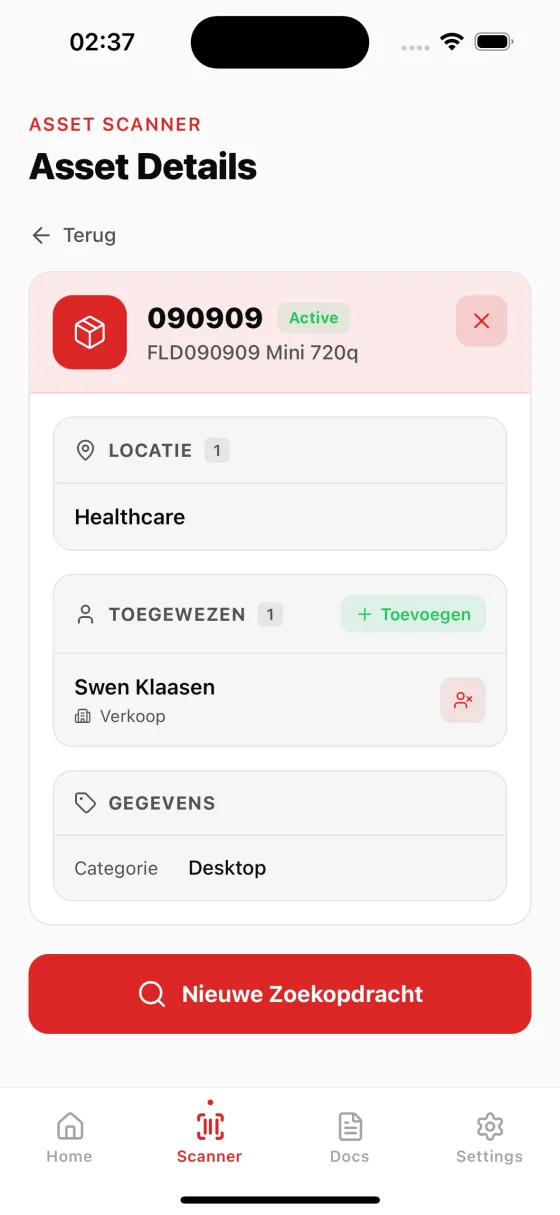
The moment you scan, BetterDesk pulls the full asset record: type, status, assignee, location, specifications, and custom fields. Everything on one screen.
Connected to TOPdesk
BetterDesk syncs with TOPdesk asset management, so every scan pulls live data. No duplicate databases, no CSV exports, just real-time access to your assets.
How it works
Scan the barcode
Open BetterDesk on your phone and point the camera at the barcode or QR code on the asset. Recognition is instant.
See asset details
The complete asset record appears: name, type, serial number, status, assigned user, location, and any custom fields from TOPdesk.
Take action
View attachments, check assignment history, start a handover form, or trigger a document workflow, all from the asset screen on your phone.
Faster audits, fewer errors, better asset data
Complete asset audits in hours instead of days
Traditional asset audits require walking through every location, reading serial numbers, and manually entering them into a system. With the BetterDesk asset scanner app, your team walks through the space and scans each barcode with their phone. The asset is instantly identified and marked as verified. What used to take a full week for a medium-sized organization can now be completed in a single afternoon. The time savings grow as your asset count increases.
Eliminate manual data entry errors
Human error is unavoidable when typing long serial numbers and asset tags by hand. A single transposed digit means misidentified assets, incorrect records, and hours of cleanup. Barcode scanning removes human input entirely. The camera reads the exact value encoded in the barcode. No typos, no misread characters, no guesswork. Your asset database stays accurate and your team can trust the data on screen.
Real-time location and status updates
Every scan is logged with a timestamp and the location where it happened. This gives you a real-time view of where your assets are and when they were last verified. If an asset was scanned in one building last week and is now reported missing in another, you have actionable data to investigate. BetterDesk turns every scan into a location checkpoint, building an asset movement trail without extra effort.
No special hardware needed
BetterDesk uses the built-in camera on any modern iPhone or Android device. No dedicated barcode scanners, no Bluetooth accessories, no specialized devices to purchase. Your team uses the phones they already carry. The scanning engine works reliably even in low-light conditions like storage rooms and server closets. Deploy asset scanning to your entire team instantly, with zero procurement.
Frequently asked questions about asset scanning
BetterDesk is a mobile app for iOS and Android that turns your phone camera into an asset scanner. Point your camera at any barcode or QR code on equipment, and BetterDesk instantly pulls up the full asset record from your TOPdesk system, including type, status, assignee, location, and custom fields.
BetterDesk supports all common barcode formats including Code 128, Code 39, EAN-13, UPC-A, and QR codes. Whether your assets use manufacturer barcodes, third-party asset tags, or labels you printed yourself, BetterDesk can scan them.
BetterDesk integrates directly with TOPdesk asset management. Your existing asset data is available on your phone the moment you connect your TOPdesk environment. No migration or duplicate data entry needed.
You can generate and print barcode labels from the BetterDesk web dashboard. Create labels for your assets, apply them to equipment, and then scan them with the mobile app for instant lookup.
BetterDesk requires an internet connection to pull asset details from TOPdesk in real time. This ensures you always see the latest asset data, including recent changes to status, assignments, or custom fields.
Yes. BetterDesk includes a continuous scanning mode designed for audits. You scan one asset after another without returning to the home screen between scans. Each scanned asset is logged with its timestamp and location. When you are done, you can review the full list of scanned items and compare it against your expected asset list to find missing or unaccounted-for items.